Third party can known as certificate authority or certification authority (CA). It is an entity that issues digital certificates for use by other parties. The digital certificates contain a public key and the identity of the owner.A CA can be a remote third party, such as VeriSign, or it can be a CA that you create for use by your organization by installing Windows 2000 Certificate Services. Certification authorities help verify transactions on the Internet. A certificate does not prove that the website that you visit is legitimate. This is due to any website also can create certificate by their own. Therefore, certification authorities is needed. One of the application of third party certification programme in Malaysia is MSC Trustgate.com Sdn Bhd.
MSC Trustgate.com Sdn Bhd was established in 1999. Trustgate is a licensed Certification Authority(CA) under the Digital Signature Act 1997 (DSA), Malaysia. They have offer complete security solutions and leading trust services that are needed by individuals, enterprises, government, and e-commerce service providers using digital certificates, digital signatures, encryption and decryption. MSC Trustgate.com Sdn Bhd had provide many service such as SSL Certificate, Managed PKI, Personal ID, MyTRUST, MyKAD ID, SSL VPN, Managed Security Services, VeriSign Certified Training and Application Development. MSC Trustgate has been appointed as Asia's first VeriSign Authorised Training Centre.Since year 2000, MSC Trustgate.com Sdn Bhd has been an affiliate of VeriSign. They focus on reselling VeriSign's Secure Sockets Layer (SSL) and Public Key Infrastructure (PKI) services to businesses and government, incorporating digital certificates, digital signatures and encryption.
The SSL Certificates that the MSC Trustgate offer to the sever security are Global Server ID (GSID) and Secure Server ID(SSID). GSID using the strongest encryption commercially available for secure communications via Server Gated Cryptography (SGC) technology. It verify your website and enables 128- or 256-bit encryption to secure communications and transactions between the site and its visitors. For the SSID, it protect the transfer of sensitive data on Web sites, intranets, and extranets using a minimum of 40-bit and up to 256-bit encryption.
VeriSign is the leading Secure Sockets Layer (SSL) Certificate Authority enabling secure e-commerce, communications, and interactions for Web sites, intranets, and extranets. VeriSign is well known for the VeriSign Secured Seal, which is an outward expression of a Web site's authentication and encryption commonly posted to VeriSign SSL Certificate customers' Web sites. The VeriSign Secured Seal was part of the VeriSign's SSL service. It can help the owner
deliver a secure and convenient way to interact with the customer over the internet. This will help the owner increase the customer's confidence to complete the transaction.
Thursday, June 25, 2009

Wednesday, June 24, 2009
Phishing- Example and Prevention Method
What is " phishing"????
Phishing which also known as “Fishing”. In other words, it is an online fraud technique used by criminals to entice you to disclose your personal information. Phishing is the fastest rising online crime method used for stealing personal finances and perpetrating identity theft.
Phishers use many different tactics to lure you, including e-mail and Web sites that mimic well-known, trusted brands. A common phishing practice involves "spamming" recipients with fake messages that resemble a valid message from a well-known Web site or a company that the recipients might trust, such as a credit card company, bank, charity, or e-commerce online shopping site.
How will a phishing email/website look like?
Here are provided some example of phishing email and website:
 What to look for in a phishing email ?
What to look for in a phishing website ?
Phishing which also known as “Fishing”. In other words, it is an online fraud technique used by criminals to entice you to disclose your personal information. Phishing is the fastest rising online crime method used for stealing personal finances and perpetrating identity theft.
Phishers use many different tactics to lure you, including e-mail and Web sites that mimic well-known, trusted brands. A common phishing practice involves "spamming" recipients with fake messages that resemble a valid message from a well-known Web site or a company that the recipients might trust, such as a credit card company, bank, charity, or e-commerce online shopping site.
How will a phishing email/website look like?
Here are provided some example of phishing email and website:
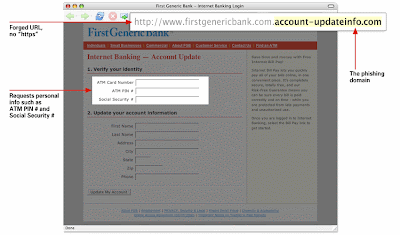
What to look for in a phishing email ?- Generic greeting. Phishing emails are usually sent in large batches. Moreover, the internet criminal will use generic names like "Dear sir/madam" or like "First Generic Bank Customer", so they don't have to type all recipients' names out and send emails one-by-one in order to save time. Therefore, be aware if you do not see your name.
- Forged link. Be aware of the forged link which is provided in email. Usually, it will appear in the email with a link that require you to update the personal information. Furthermore, even if a link has a name you recognize somewhere in it, it doesn't mean it links to the real organization. Also, websites where it is safe to enter personal information begin with "https" — the "s" stands for secure. If you don't see "https" then do not proceed.
- Requests personal information. Usually, some email will request for personal information. Therefore, if you receive an email requesting your personal information, it is probably a phishing attempt.

What to look for in a phishing website ?
- Poor resolution. Phishing websites are often poor in quality, since they are created with urgency and have a short lifespan. If the resolution on a logo or in text strikes you as poor, be suspicious.
Below are some of the recommendation about the prevention method of "Phishing":
Keep antivirus up to date – The most important things you can do to avoid phishing attacks is keeping your antivirus software up-to-date。This is because most of the antivirus vendors have signatures that protect against some common technology exploits. Thus, can prevent things such as a Trojan disguising your Web address bar or mimicking an https secure link. If your antivirus software is not keep up-to-date, you are usually more vulnerable to attack which can seize your Web browser and put you at risk.
Do not click on hyperlinks in e-mails – Never! Never! Never click on any hyperlink in an e-mail, especially from unknown sources. You never know where the link is going to really take you or whether it will trigger malicious code. Moroever, some hyperlinks can take you to a replicate HTML page that may try to scam you into typing private information. If you really want to check out the link, manually retype it into a Web browser.
Take advantage of anti-spam software – Anti-spam software can help keep phishing attacks at a minimum. A lot of attacks come in the form of spam. By using anti-spam software such a Qurb, the phishing attacks can be reduced because the messages will never end up in the mailboxes of end users.
Pay attention to your billing cycle. If credit card or utility bills fail to arrive, contact the companies to ensure that they have not been illicitly redirected.
Use anti-spyware software –Keep spyware down to a minimum by installing an active spyware solution such as Microsoft Antispyware and also scanning with a passive solution such as Spybot. If for some reason your browser is hijacked, anti-spyware software can often detect the problem and provide a solution..
References:
http://antivirus.about.com/od/emailscams/ss/phishing.htm
http://www.phishtank.com/what_is_phishing.php?view=website
Tuesday, June 23, 2009
How to safeguard personal and financial data?
Nowadays, most people rely on computers to save our personal data and using online financial services to do financial transactions such as online banking. Information transmitted over the Internet is more vulnerable and has a higher degree of security risk, the information will easily stolen or hacked by others. Therefore, every user must know some ways to safeguard their personal or financial data.
Below will be some suggestion ways for users to safeguard their data:

1. Usernames and passwords
The longer passwords will provide greater security than shorter passwords. If can, try to change the password frequently and do not disclose to anyone.
2. Install and update antivirus software and firewall.
Install the antivirus software and firewall in order to protect yourself against viruses and Trojan horses that may steal or modify the data on your own computer. In order to well protection, you must make sure to keep your antivirus up to date.

3. Regularly scan your computer for spyware
Spyware or adware hidden in software programs may affect the performance of your computer and give attackers access to your data. Use a legitimate anti-spyware program to scan your computer and remove any of the infected files.
4. Encrypt any sensitive files
Encryption is a process of converting readable data into unreadable characteristic to prevent unauthorized access. By encrypting files, you can ensure that unauthorized people can’t view data even if they can physical access it. When you use encryption, it is important to remember your passwords, if you forget the passwords, you may lose your data.
5. Avoid accessing financial information in public
Resist to logging on your bank account or others important data when working from a coffee shop that offers wireless access, Although the systems are convenient, it also easy for hacker the your information though the public wireless access.
References:
http://finance.yahoo.com/banking-budgeting/article/103893/Six-Ways-to-Safeguard-Your-Online-Assets
http://www.us-cert.gov/cas/tips/ST06-008.html
Below will be some suggestion ways for users to safeguard their data:

1. Usernames and passwords
The longer passwords will provide greater security than shorter passwords. If can, try to change the password frequently and do not disclose to anyone.
2. Install and update antivirus software and firewall.
Install the antivirus software and firewall in order to protect yourself against viruses and Trojan horses that may steal or modify the data on your own computer. In order to well protection, you must make sure to keep your antivirus up to date.

3. Regularly scan your computer for spyware
Spyware or adware hidden in software programs may affect the performance of your computer and give attackers access to your data. Use a legitimate anti-spyware program to scan your computer and remove any of the infected files.
4. Encrypt any sensitive files
Encryption is a process of converting readable data into unreadable characteristic to prevent unauthorized access. By encrypting files, you can ensure that unauthorized people can’t view data even if they can physical access it. When you use encryption, it is important to remember your passwords, if you forget the passwords, you may lose your data.
5. Avoid accessing financial information in public
Resist to logging on your bank account or others important data when working from a coffee shop that offers wireless access, Although the systems are convenient, it also easy for hacker the your information though the public wireless access.
References:
http://finance.yahoo.com/banking-budgeting/article/103893/Six-Ways-to-Safeguard-Your-Online-Assets
http://www.us-cert.gov/cas/tips/ST06-008.html
Friday, June 19, 2009
Revenue model for Google, eBay, Amazon.com
Revenue model are the technique, method or model can be use by all e-commerce company to generate profit. However, various e-commerce companies will use different method to generate profit.
Revenue model for Google
Google's revenue for the year ended 31 March 2009 is $ 5.5 billion. Advertising fees is the main sources for Google generate profit because it was made up 97% of revenue. Google has provided a few advertising model for advertiser to choose it, for example:
Google AdWord offers pay-per-click (PPC) advertising. The advertisers are paid Google for clicks to their site when their advertisements are shown in Google searches or on sites that display Google advertisements relevant to their content. The AdWords program includes local, national, and international distribution.
Google AdSense was another advertising model. This advertising model is similar to Google Adword. However, it is advertisement serving program run by Google and website owner display advertiser’s Google AdWord advertisements on their site and share in the revenue when AdWord advertisement was click by visitors and an Adwords customer pays Google. Furthermore, website owners can enroll in the program to enable text and video advertisements on their website.
Google Answer is an Internet search and research service offered for a fee by Google. Researchers are answer customer question and Google keeps 25% of the payment, sends the rest to the Researchers. However, Google Answer will offer a price for an answer before the answer is provide by researcher.
Froogle, also known as Google product search which is a service from Google that makes it easy to find information about products for sale online. Froogle is a price engine website launched by Google Inc. Furthermore, Google also sells advertising through AdWord to be displayed in Froogle.
The following table presents Google revenue for the year ended 31 March 2009:
Revenue model for eBay
eBay is an online aution and shopping website in which people and businesses buy and sell a broad variety goods and services worldwide. In year 2009’s first quarter, net revenue of eBay is $2.02 billion. In addition, eBay generates revenue from a number of fees such as transaction fees, subscription fees and so on. For example:
Transaction fees
Insertion fee- amount of money eBay charges to the seller for listing an item for sale. It is vary depending on the starting price of the item and the category the seller chooses to list. Furthermore, it is nonrefundable.
Final Value Fee (FVF) - amount of money eBay charges the seller when an item sells. FVF based on the final selling price of an item at the close of the listing whereas there is no charged when an item does not sell.
Subscription fees
As an eBay Store owner, they can to list their items at a set price, so buyers can purchase items immediately without bidding. However, it was include monthly subscription fees and the amount of fees payment is base on store level (basic, premium and anchor).
Beside that, eBay now owns the PalPay payment system which has fees of its own. PayPal is how individuals and businesses send and receive money online. To sell on eBay, Personal Paypal accounts cannot receive credit card payments except sellers have Premier or Business Account upon receipt of a credit-card-funded payment because eBay is accept many form of payment such as credit card or debit card. PayPal will charge seller’s Premier and Business accounts fees to receive buyer payments. Furthermore, Paypal charged on receive payment is depend on monthly sale volume and total payment volume via PayPal increased 61 percent in year 2008 in eBay auction site.
On the other hand, eBay generate the revenue from getting the commission for every complete sale made by subsidiary company, Half .com. eBay purchased Half.com in 2000 for roughly $350 million and sellers offer items at fixed prices in Half.com. The ratios of commission depend to different selling price.
The following table presents eBay revenue for the year ended 31 March 2009:
Revenue model for Amazon.com
Amazon is a first major company selling goods through internet, also known as e-commerce. It was generate US $177 million as net profit for year 2009' s first quarter. Amazon is using various ways to generate profit. For example:
Sales
Amazon.com getting a revenue from sales of goods such as selling music CDs, videotapes and DVDs, kitchen items, lawn and garden items, toys & games, baby products, sporting goods, jewelry and so on.
Transaction fees
In year 2001, Amazon.com was launched Amazon Marketplace where is fixed-price online marketplace that allows sellers or third party to offer their goods alongside Amazon's offerings. Therefore, Amazon can receive commission via Amazon Marketplace by charges commission rate based on different category of items, per-transaction fee and variable closing fee.
However, the charged only allow after the item sold. The items from Amazon Marketplace can be more satisfy customer need than item sell directly from Amazon. For example, book has author signature that sell via Amazon Marketplace but it do not has selling via Amazon. Therefore, Amazon Marketplace is one of the sales strategies and program has been very profitable for Amazon.com.
Affiliate fees
aStore is an Amazon.com affiliate product which website owners can use to create a professional online store, in minutes and without the need for programming skills, that can be embedded within or linked to from website owner website. Website owners pick products from Amazon's store and earn referral fees on the products purchased by their readers. However, the store does not allow website owners to sell their own products directly. The affiliate fees normally in ranges from 4% to 10% of the product price.
The following table presents Amazon.com revenue for the year ended 31 March 2009:
Revenue model for Google
Google's revenue for the year ended 31 March 2009 is $ 5.5 billion. Advertising fees is the main sources for Google generate profit because it was made up 97% of revenue. Google has provided a few advertising model for advertiser to choose it, for example:
Google AdWord offers pay-per-click (PPC) advertising. The advertisers are paid Google for clicks to their site when their advertisements are shown in Google searches or on sites that display Google advertisements relevant to their content. The AdWords program includes local, national, and international distribution.
Google AdSense was another advertising model. This advertising model is similar to Google Adword. However, it is advertisement serving program run by Google and website owner display advertiser’s Google AdWord advertisements on their site and share in the revenue when AdWord advertisement was click by visitors and an Adwords customer pays Google. Furthermore, website owners can enroll in the program to enable text and video advertisements on their website.
Google Answer is an Internet search and research service offered for a fee by Google. Researchers are answer customer question and Google keeps 25% of the payment, sends the rest to the Researchers. However, Google Answer will offer a price for an answer before the answer is provide by researcher.
Froogle, also known as Google product search which is a service from Google that makes it easy to find information about products for sale online. Froogle is a price engine website launched by Google Inc. Furthermore, Google also sells advertising through AdWord to be displayed in Froogle.
The following table presents Google revenue for the year ended 31 March 2009:
Revenue model            $(in thousands) Percentage
Advertising revenue:
Google web sites              3692,8      67
Google Network web sites      1638,1      30
Total advertising revenues    5330,9      97

Licensing and other revenues   178,1       3

Revenue                       5509,0      100
Revenue model for eBay
eBay is an online aution and shopping website in which people and businesses buy and sell a broad variety goods and services worldwide. In year 2009’s first quarter, net revenue of eBay is $2.02 billion. In addition, eBay generates revenue from a number of fees such as transaction fees, subscription fees and so on. For example:
Transaction fees
Insertion fee- amount of money eBay charges to the seller for listing an item for sale. It is vary depending on the starting price of the item and the category the seller chooses to list. Furthermore, it is nonrefundable.
Final Value Fee (FVF) - amount of money eBay charges the seller when an item sells. FVF based on the final selling price of an item at the close of the listing whereas there is no charged when an item does not sell.
Subscription fees
As an eBay Store owner, they can to list their items at a set price, so buyers can purchase items immediately without bidding. However, it was include monthly subscription fees and the amount of fees payment is base on store level (basic, premium and anchor).
Beside that, eBay now owns the PalPay payment system which has fees of its own. PayPal is how individuals and businesses send and receive money online. To sell on eBay, Personal Paypal accounts cannot receive credit card payments except sellers have Premier or Business Account upon receipt of a credit-card-funded payment because eBay is accept many form of payment such as credit card or debit card. PayPal will charge seller’s Premier and Business accounts fees to receive buyer payments. Furthermore, Paypal charged on receive payment is depend on monthly sale volume and total payment volume via PayPal increased 61 percent in year 2008 in eBay auction site.
On the other hand, eBay generate the revenue from getting the commission for every complete sale made by subsidiary company, Half .com. eBay purchased Half.com in 2000 for roughly $350 million and sellers offer items at fixed prices in Half.com. The ratios of commission depend to different selling price.
The following table presents eBay revenue for the year ended 31 March 2009:
Revenue model
                      $(In thousands)Percentage
Marketplaces                 1,033,827      51
Payments                       604,833      30
Communication                  143,238       8
Total marketing services and   238,688      11
other revenue

Total Revenue                2,020,588     100
Revenue model for Amazon.com
Amazon is a first major company selling goods through internet, also known as e-commerce. It was generate US $177 million as net profit for year 2009' s first quarter. Amazon is using various ways to generate profit. For example:
Sales
Amazon.com getting a revenue from sales of goods such as selling music CDs, videotapes and DVDs, kitchen items, lawn and garden items, toys & games, baby products, sporting goods, jewelry and so on.
Transaction fees
In year 2001, Amazon.com was launched Amazon Marketplace where is fixed-price online marketplace that allows sellers or third party to offer their goods alongside Amazon's offerings. Therefore, Amazon can receive commission via Amazon Marketplace by charges commission rate based on different category of items, per-transaction fee and variable closing fee.
However, the charged only allow after the item sold. The items from Amazon Marketplace can be more satisfy customer need than item sell directly from Amazon. For example, book has author signature that sell via Amazon Marketplace but it do not has selling via Amazon. Therefore, Amazon Marketplace is one of the sales strategies and program has been very profitable for Amazon.com.
Affiliate fees
aStore is an Amazon.com affiliate product which website owners can use to create a professional online store, in minutes and without the need for programming skills, that can be embedded within or linked to from website owner website. Website owners pick products from Amazon's store and earn referral fees on the products purchased by their readers. However, the store does not allow website owners to sell their own products directly. The affiliate fees normally in ranges from 4% to 10% of the product price.
The following table presents Amazon.com revenue for the year ended 31 March 2009:
North America        $ (in million)     Percentage

Net sale                  2,578            26
Media                     1,305            13
Electronic and other      1,172            12
general merchandise
Other                       101             1

International
Net sale                  2,311            24
Media                     1,418            15
Electronic and other        874             9
general merchandise
Other                        19          0.002

Total revenue              9778           100
Thursday, June 18, 2009
The History and evolution of E-commerce
Electronic Commerce is also known as e-commerce, it consists of the buying and selling of products or services over electronic system such as the Internet and other computer networks. E-commerce was began soon after Samuel Morse sent his first telegraph message in 1844s,after that it expanded across the sea when they used for exchanged information from the New York market, linked Europe and North American in 1858s.
In 1970s, they using technology such as Electronic Data Interchange (EDI) and Electronic Funds Transfer (EFT) for businesses to sent commercial documents like purchase orders or invoices electronically. The growth of the environment, the e-commerce having credit cards, automated teller machines (ATM), telephone banking services and auto manufacturers. Besides that, Sabre was form the airline reservation system and Michael Aldrich form the online shopping in UK in the 1980s.
From the 1990s onwards, electronic commerce would additionally include enterprise resource planning systems (ERP), data mining and data warehousing. In 1990s, Tim Berners-Lee writes the first web browser and WorldWideWeb (WWW). In 1994s, Netscape release the Navigator browser under the code name “Mozilla”. Therefore, the first online bank opens and Pizza Hut offers pizza ordering on its Web page. Adult materials also become commercially available such as do cars and bike. Netscape 1.0 is introduced the Secure Sockets Layer (SSL) encryption that made transaction secure. In 1995s, Jeff Bezos launches Amazon.com and the first commerce-free 24 hours, internet-only radio stations. Beside that, Dell and Cisco begin to aggressively use Internet for commercial transaction and Pierre Omidyar form the eBay as auction web. In 1998, the electronic postal stamps can be purchased ans downloaded for printing from the web.
In 1999s, Darcy DiNucci was coined “Web 2.0”, Web 2.0 refer to a second generation of the web development and design, it is characterized as facilitating communication, information sharing, interoperability, user-centered design and collaboration on the “WWW”.
In 2000, there was the bottom fell out the dot-com industry and hundreds of dot-com companies went bankrupt. In 2001, the e-commerce was growing back. In 2007, Bussiness.com acquired R.H.Donnelley , who is a telephonedirectory publisher. In last year, US e-commerce and Online Retial sales projected to reach $204 million and an increase of 17% over 2007.
Reference source:
http://www.answers.com/topic/electronic-commerce#Dictionary_ans
http://www.answers.com/topic/web-2-0#Blogs_ans
http://www.timetoast.com/timelines/5448
In 1970s, they using technology such as Electronic Data Interchange (EDI) and Electronic Funds Transfer (EFT) for businesses to sent commercial documents like purchase orders or invoices electronically. The growth of the environment, the e-commerce having credit cards, automated teller machines (ATM), telephone banking services and auto manufacturers. Besides that, Sabre was form the airline reservation system and Michael Aldrich form the online shopping in UK in the 1980s.
From the 1990s onwards, electronic commerce would additionally include enterprise resource planning systems (ERP), data mining and data warehousing. In 1990s, Tim Berners-Lee writes the first web browser and WorldWideWeb (WWW). In 1994s, Netscape release the Navigator browser under the code name “Mozilla”. Therefore, the first online bank opens and Pizza Hut offers pizza ordering on its Web page. Adult materials also become commercially available such as do cars and bike. Netscape 1.0 is introduced the Secure Sockets Layer (SSL) encryption that made transaction secure. In 1995s, Jeff Bezos launches Amazon.com and the first commerce-free 24 hours, internet-only radio stations. Beside that, Dell and Cisco begin to aggressively use Internet for commercial transaction and Pierre Omidyar form the eBay as auction web. In 1998, the electronic postal stamps can be purchased ans downloaded for printing from the web.
In 1999s, Darcy DiNucci was coined “Web 2.0”, Web 2.0 refer to a second generation of the web development and design, it is characterized as facilitating communication, information sharing, interoperability, user-centered design and collaboration on the “WWW”.
In 2000, there was the bottom fell out the dot-com industry and hundreds of dot-com companies went bankrupt. In 2001, the e-commerce was growing back. In 2007, Bussiness.com acquired R.H.Donnelley , who is a telephonedirectory publisher. In last year, US e-commerce and Online Retial sales projected to reach $204 million and an increase of 17% over 2007.
Reference source:
http://www.answers.com/topic/electronic-commerce#Dictionary_ans
http://www.answers.com/topic/web-2-0#Blogs_ans
http://www.timetoast.com/timelines/5448
Wednesday, June 17, 2009
Failure of Boo.com and its causes

Nowadays there are a lot of people using e-commerce to do their business. This is due to its convenience for those people who are working or prefer to start their own business and does not have enough capital. E-commerce also knows as electronic commerce. There are a lot of successful in e-commerce companies such as eBay, Amazon, yahoo and Google. However, on the opposite side there are also have companies that are failure such as webvan.com, pets.com, etoys.com and etc.
Therefore, at here we will discuss about the failure of Boo.com and its causes.
Boo.com was a European company founded in 1998 and operating out of a London head office. The founded of Boo.com are three Swedish entrepreneurs, Ernst Malmsten, Kajsa Leander and Patrik Hedelin. The main business of Boo.com was selling branded fashion over the internet and as an online fashion store. The customer range that they target was from 18 to 24 year olds.
Therefore, at here we will discuss about the failure of Boo.com and its causes.

Boo.com was a European company founded in 1998 and operating out of a London head office. The founded of Boo.com are three Swedish entrepreneurs, Ernst Malmsten, Kajsa Leander and Patrik Hedelin. The main business of Boo.com was selling branded fashion over the internet and as an online fashion store. The customer range that they target was from 18 to 24 year olds.
 Boo.com wills failure because they did not carefully plan their business by considers the 4 P’s (Price, Product, Place and Promotion) and the environmental factors. Boo.com was surrounding by many problem and they mismanage it. Many of the customer criticized that the website was too complicated and the design was very poor. This is due to the site was heavily relied on the JavaScript and Flash. Therefore, the home page will require several hundred kilobytes to load it but at that time many people used dial up internet and broadband technologies were still not widely been use. Therefore, the users will have to wait for long time to load the page. Otherwise, the website also not usability because the user difficult to get where they want to go. Other than that, the complicated design required the site to be displayed in a fixed size window. This will limit the space that available to display product information to the customer.
Boo.com had a policy of “limiting the amount of transaction they made to three per twenty minute” which will discourage customer to shop at Boo.com again. They had spent 125 million in just 6 month to market itself globally but had issues with different language, prices, and tax. If there are return items from customer, the company will help them to pay the postage. This had proved that, they did not manage their capital effectively. Finally, the end of boo.com came on May 18th 2000.
References:
Sunday, June 14, 2009
Ebay success and its causes

On the Sept 5 1995, E-bay was founded by Pierre Omidyar. He is French –born Iranian computer programmer. E-bay as the world’s largest online trading offers a wide range of opportunity that user can come together in one internet site to trade and buy. The item such as collectibles décor, appliances computers furnishings equipment vehicles and even the service can be sold too. As long as the item is not illegal and does not breach the e-bay policy, sellers are permitted to list items for sale. For the buyers are allowed to bid which things they are interested.
In order to become e-Bay users,, they need to register first by filling their information, E-bay web site enables users browse through listed items in a fully convenient and automated way.
 According to Kevin Pursglove who is spokesperson of e-Bay, the success of e-Bay is allowing people to often times connect with some very fond and special early childhood memories. Example such as collecting baseball cards to toy soldiers to Barbie dolls to doll houses and so forth.
Next, he thinks that people really enjoy the experience of the shopping bazaar by going through the process of looking around the merchandise. Besides that, he believes that people really enjoy the competition of the bidding process. With the auction format of e-Bay, user can get a bargain price and negotiate a little bit over the price. Another reason of e-Bay success is e-Bay have cooperate with America online that the company have a number of arrangements with smaller sites that go back several years as an exchange to persuade people surf e-Bay website.
In order to become e-Bay users,, they need to register first by filling their information, E-bay web site enables users browse through listed items in a fully convenient and automated way.
 According to Kevin Pursglove who is spokesperson of e-Bay, the success of e-Bay is allowing people to often times connect with some very fond and special early childhood memories. Example such as collecting baseball cards to toy soldiers to Barbie dolls to doll houses and so forth.
 Next, he thinks that people really enjoy the experience of the shopping bazaar by going through the process of looking around the merchandise. Besides that, he believes that people really enjoy the competition of the bidding process. With the auction format of e-Bay, user can get a bargain price and negotiate a little bit over the price. Another reason of e-Bay success is e-Bay have cooperate with America online that the company have a number of arrangements with smaller sites that go back several years as an exchange to persuade people surf e-Bay website.
References:
Subscribe to:
Posts (Atom)


